Binary, Octal and Hexadecimal
In the previous article we saw why hardware works in two states. In this one we learn to count in binary, and in the two shorthand bases, hexadecimal and octal, that make binary bearable for humans. You already know one number system well, decimal, and once you see why decimal works the way it does, the other bases follow in an afternoon.
Positional notation
Take the number 345. What it means is
$$345 = 3 \times 100 + 4 \times 10 + 5 \times 1 = 3 \times 10^2 + 4 \times 10^1 + 5 \times 10^0$$
The rightmost digit is worth 1, which is $10^0$. The next one to the left is worth 10, the next 100. Each position is worth ten times the one to its right because we are working in base 10, with ten digit symbols, 0 to 9.
We use base 10 because we have ten fingers. There is nothing mathematically special about it. Base 12 is arguably more convenient, since 12 divides by 2, 3, 4 and 6, which is why we have 12 inches in a foot and 24 hours in a day. For hardware, as the last article showed, base 2 is the natural choice.
The positional idea works for any base. In base $B$, a number with digits $d_n d_{n-1} \ldots d_1 d_0$ has the value
$$\text{Value} = \sum_{i=0}^{n} d_i \cdot B^i$$
Set $B = 2$ and you have binary. Set $B = 16$ and you have hexadecimal. The structure is the same; only the base and the number of digit symbols change.
Binary
In binary $B = 2$ and the only digits are 0 and 1. The column weights are powers of two:
$$\ldots 2^5,\ 2^4,\ 2^3,\ 2^2,\ 2^1,\ 2^0 = \ldots 32,\ 16,\ 8,\ 4,\ 2,\ 1$$
Figure 1 reads the binary number 101101 by adding up the weights of the columns that contain a 1.
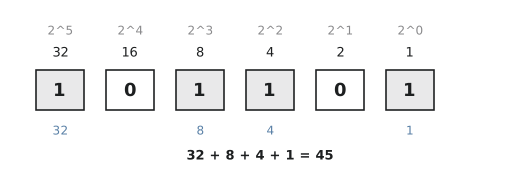
$$1 \times 32 + 0 \times 16 + 1 \times 8 + 1 \times 4 + 0 \times 2 + 1 \times 1 = 45$$
In C, Python and Verilog you will see this written as 0b101101. The prefix tells the compiler which base the digits are in.
Powers of two
You will save yourself a lot of time by memorising the powers of two up to $2^{10}$, and knowing the few larger ones that come up constantly.
| Power | Value | Common name |
|---|---|---|
| $2^0$ | 1 | |
| $2^1$ | 2 | |
| $2^2$ | 4 | |
| $2^3$ | 8 | |
| $2^4$ | 16 | |
| $2^5$ | 32 | |
| $2^6$ | 64 | |
| $2^7$ | 128 | |
| $2^8$ | 256 | |
| $2^{10}$ | 1,024 | 1K |
| $2^{16}$ | 65,536 | 64K |
| $2^{20}$ | 1,048,576 | 1M |
| $2^{30}$ | 1,073,741,824 | 1G |
Since $2^{10} = 1024$ is close to 1000, computing borrowed the prefix “kilo” for 1024. This is why a hard disk sold as 500 GB shows up as about 465 GB in your operating system: the manufacturer counts in powers of ten and the OS counts in powers of two. Same bytes, different units.
Hexadecimal
Binary is right for hardware and wrong for people. A 32-bit address written in binary is 32 characters long and impossible to read at a glance. Hexadecimal, base 16, is the shorthand we use instead.
Base 16 needs 16 digit symbols. We keep 0 to 9 and add A to F for 10 to 15.
| Hex | Decimal | Binary |
|---|---|---|
| 0 | 0 | 0000 |
| 1 | 1 | 0001 |
| 2 | 2 | 0010 |
| 3 | 3 | 0011 |
| 4 | 4 | 0100 |
| 5 | 5 | 0101 |
| 6 | 6 | 0110 |
| 7 | 7 | 0111 |
| 8 | 8 | 1000 |
| 9 | 9 | 1001 |
| A | 10 | 1010 |
| B | 11 | 1011 |
| C | 12 | 1100 |
| D | 13 | 1101 |
| E | 14 | 1110 |
| F | 15 | 1111 |
The important property is that one hex digit is exactly four bits, because $16 = 2^4$. So you can translate between hex and binary by substitution, one digit at a time, with no arithmetic at all. The 32-bit address 11001010111100001111111000000001 becomes 0xCAF0FE01: eight characters instead of thirty-two, and the same information.
Hex is everywhere: web colours (#FF5733 is FF of red, 57 of green, 33 of blue), memory maps, register descriptions and debugger output.
Octal
Octal is base 8, with digits 0 to 7, and one octal digit is three bits since $8 = 2^3$. You will not see it much in hardware design, but it survives in Unix file permissions, which are three groups of three bits:
rwxr-xr-x
111 101 101  (binary)
  7   5   5  (octal)
When you type chmod 755 script.sh you are writing octal. Read is 4, write is 2, execute is 1. The owner gets 4+2+1 = 7, and the group and others get 4+0+1 = 5.
One thing to watch out for in C: a numeric literal starting with 0 is octal, so int x = 010; sets x to 8, not 10. Python 3 requires an explicit 0o prefix for the same reason.
0 to 31 in the four bases
| Dec | Binary | Octal | Hex |
|---|---|---|---|
| 0 | 00000 | 00 | 00 |
| 1 | 00001 | 01 | 01 |
| 2 | 00010 | 02 | 02 |
| 3 | 00011 | 03 | 03 |
| 4 | 00100 | 04 | 04 |
| 5 | 00101 | 05 | 05 |
| 6 | 00110 | 06 | 06 |
| 7 | 00111 | 07 | 07 |
| 8 | 01000 | 10 | 08 |
| 9 | 01001 | 11 | 09 |
| 10 | 01010 | 12 | 0A |
| 11 | 01011 | 13 | 0B |
| 12 | 01100 | 14 | 0C |
| 13 | 01101 | 15 | 0D |
| 14 | 01110 | 16 | 0E |
| 15 | 01111 | 17 | 0F |
| 16 | 10000 | 20 | 10 |
| 17 | 10001 | 21 | 11 |
| 18 | 10010 | 22 | 12 |
| 19 | 10011 | 23 | 13 |
| 20 | 10100 | 24 | 14 |
| 21 | 10101 | 25 | 15 |
| 22 | 10110 | 26 | 16 |
| 23 | 10111 | 27 | 17 |
| 24 | 11000 | 30 | 18 |
| 25 | 11001 | 31 | 19 |
| 26 | 11010 | 32 | 1A |
| 27 | 11011 | 33 | 1B |
| 28 | 11100 | 34 | 1C |
| 29 | 11101 | 35 | 1D |
| 30 | 11110 | 36 | 1E |
| 31 | 11111 | 37 | 1F |
A few conversions
Binary to decimal. Convert $10110011_2$. Line the bits up under their weights:
| Position | 7 | 6 | 5 | 4 | 3 | 2 | 1 | 0 |
|---|---|---|---|---|---|---|---|---|
| Weight | 128 | 64 | 32 | 16 | 8 | 4 | 2 | 1 |
| Bit | 1 | 0 | 1 | 1 | 0 | 0 | 1 | 1 |
Add the weights under the 1s: $128 + 32 + 16 + 2 + 1 = 179$.
Hex to decimal. Convert 0xB4. B is 11, so
$$11 \times 16^1 + 4 \times 16^0 = 176 + 4 = 180$$
Hex to binary. Convert 0x3A7F. No arithmetic, just replace each digit with its four bits:
$$\mathtt{3} = 0011,\quad \mathtt{A} = 1010,\quad \mathtt{7} = 0111,\quad \mathtt{F} = 1111$$
so the answer is $0011,1010,0111,1111_2$.
Practice Exercise
- Convert $11010110_2$ to decimal and to hex.
- Convert
0x2Fto binary and to decimal. - What is
chmod 640in binary, and what does it allow?
Solution
- $128 + 64 + 16 + 4 + 2 = 214$. Grouping in fours,
1101 0110is0xD6. 0x2Fis0010 1111, and $2 \times 16 + 15 = 47$.- 640 is
110 100 000: the owner can read and write, the group can read, and others have no access.
In the next article we look at the conversion techniques in more detail, including the ones you can do in your head without a calculator.