Fixing a Real DRC Violation
In the previous article we ran DRC and got four violations. A report is only useful if you act on it. In this article we take the first met1.2 spacing violation and carry it all the way through to a clean re-run.
Finding the violation
The report entry was:
Metal1 spacing < 0.14um (met1.2)
----------------------------------------
88.050 55.900 88.190 56.100
The box surrounds the gap between the two offending shapes, so you know exactly where to look. Open the layout in Magic interactively:
magic -rcfile "$PDK_ROOT/sky130A/libs.tech/magic/sky130A.magicrc" &
Then, in Magic’s console:
gds read runs/uart_full/results/final/gds/uart_top.gds
load uart_top
box 88.05um 55.9um 88.19um 56.1um
findbox zoom
zoom 0.2
drc why
box places Magic’s box on the reported coordinates, findbox zoom zooms the view to it, and zooming out a little gives you enough surrounding context to see both met1 shapes and why they ended up so close. drc why prints the rule broken inside the box, which confirms you are looking at the right place. In our case, two met1 routes of unrelated nets both jog past the same congested spot in a cell row, and the router left them 0.09 µm apart against a 0.14 µm rule.
Choosing a fix
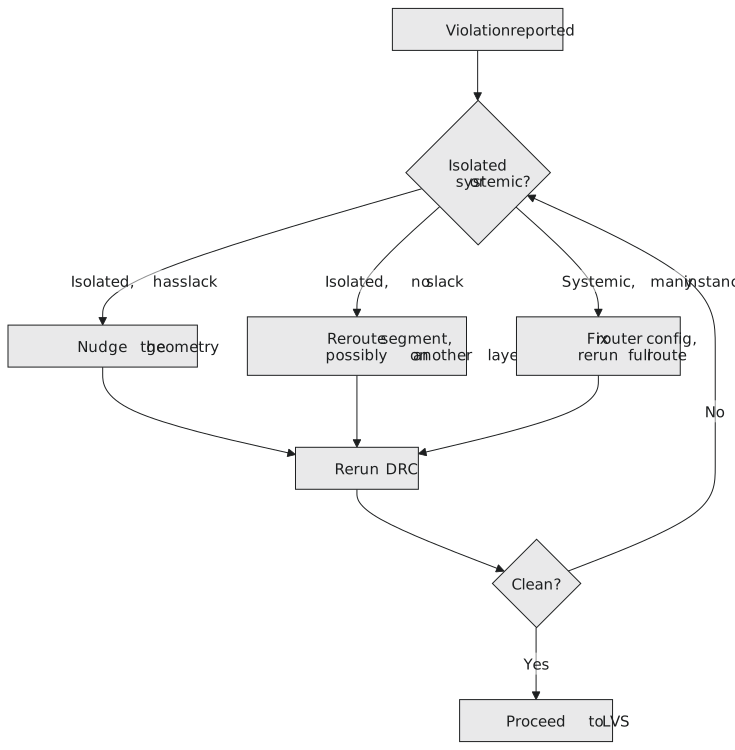
There are three ways to resolve a spacing violation like this, in order of how invasive they are:
- Nudge one segment. If there is free space on one side, move the shape a few tens of nanometres away from its neighbour. This is the cheapest fix with no knock-on effects.
- Reroute the segment on another track or layer. If there is no room to nudge, move one segment’s route entirely, often up a metal layer for a short stretch.
- Change the router setup and route again. If the violation is one of many with the same cause, the right fix is a routing configuration change and a new route, not hand editing. This is for the “hundreds of violations of one rule” case, not for a single one like this.
Figure 1 summarises the decision. Our violation is a single instance with visible space on one side, so a nudge is the right level. Changing the router setup for a one-off violation is a good way to create a new problem while fixing this one.
Making the edit
In Magic, select the met1 paint on one side of the gap and move it away from its neighbour:
box 88.05um 55.9um 88.12um 56.1um
select area metal1
what
move e 0.06um
what lists what is selected, so check it is the single met1 segment you expect before moving anything. The move shifts it 60 nm east, which opens the gap from 0.09 µm to 0.15 µm and clears the 0.14 µm rule with a small margin. Save and write a new GDS:
save uart_top
gds write uart_top_fixed.gds
Two things I would always keep in mind here. First, do not fix a spacing violation by landing exactly on the rule value. The minimum in the deck is a hard floor, not a target, and a fix that sits at exactly 0.14 µm can trip again after an unrelated edit nearby. Leave a little margin where there is room.
Second, a moved shape can come off the via it depended on, trading a DRC violation for a broken connection that only LVS will catch later. After any manual move, select the segment and use what again, or look at it with its connected vias, to be sure it still connects where it should.
Also be aware of what hand editing does to your data. The fixed GDS now differs from the routed DEF and database that OpenLane holds. On a real project you either make the same change in the routing database (so every later step sees it), or you keep a record of the manual edits and reapply them whenever the GDS is regenerated. Otherwise the next run silently brings the violation back.
Running DRC again
The second met1.2 violation, at (91.410, 62.230), is in the same congested row a few microns further along, and it gets the same treatment: find it, check there is room, nudge one segment by 60 nm. Then use the batch script from the previous article on the fixed GDS, changing the file name and the cell name to uart_top_fixed. The report is now:
Metal2 overlap of via1 < 0.055um (met2.4)
----------------------------------------
102.870 40.115 102.930 40.175

Local interconnect spacing < 0.17um (li.3)
----------------------------------------
45.230 102.415 45.400 102.585

COUNT: 2
Both met1.2 entries have gone and nothing new has appeared. That second part matters as much as the first: always re-run the full check after a fix rather than assuming you know everything it changed.
This is what a real DRC cleanup looks like: not one dramatic fix that clears everything, but working through the list one rule at a time until the count reaches zero. In a real signoff you would now repeat the same cycle, locate, choose a fix, edit, re-run, for the remaining met2.4 and li.3 violations before the layout goes anywhere near LVS. We will not walk through them here because the mechanism does not change.
Practice Exercise
The remaining met2.4 violation is an enclosure problem: the via1 at (102.870, 40.115) to (102.930, 40.175) is not covered by its met2 shape by enough on one side, short by 0.02 µm. Which of the three fix options fits, and what would you actually change, the via or the metal around it?
Solution
This is a nudge-level fix, like the met1.2 one: a single, isolated instance.
Change the metal, not the via. Via cuts are fixed-size shapes defined by the technology; you do not resize them to fix an enclosure. Extend the met2 shape on the short side by at least 0.02 µm, and preferably a little more, say 0.03 to 0.04 µm, so the via is enclosed with margin. Then re-run DRC, because the longer met2 end can now come too close to a neighbouring met2 shape.
Moving the via instead would shift the enclosure problem to another edge or create a new spacing violation with something nearby.
A DRC-clean layout is buildable, but that does not make it correct. In the next article we look at why a layout can pass every geometric rule in the deck and still implement the wrong circuit.