Cross-Probing Between Layout and Netlist
In the previous article we learned to read the layers. In this article we follow a single signal through them. Netgen’s LVS run in Module 8 already showed that the layout’s connectivity matches the final netlist. So why click on a net by hand afterwards? Because “the comparison says it matches” and “I can see that this piece of metal really is baud_div_out, and it goes where I expect” are different kinds of confidence. The second is what you need when LVS does fail and you have to find the problem, and it is how you build a feel for what the router did.
Tracing a net in KLayout
KLayout has a net tracer (Tools > Trace Net). Click on a piece of metal and it follows the connection through every touching shape and every via, on every layer, and highlights the whole electrical net. It uses the layer connections defined in the technology, so load the SKY130 technology first, as in the previous article. If your version of the technology file does not define the connections, you can enter them in the net tracer’s setup: which layers connect through which via layers.
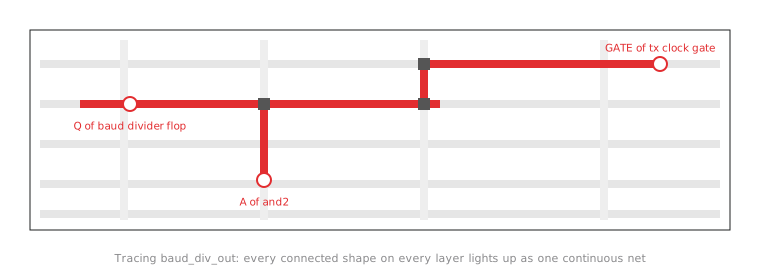
Try it on baud_div_out, the net we broke and repaired in the LVS lab. Start from the output of the divider flop and trace. The highlight should run through the met1, met2 and met3 pieces and their vias as one continuous shape, ending at the pins of every cell the netlist lists on that net, including the GATE pin of the transmit clock gate. Figure 1 shows the idea.
Finding a net by name
The net tracer works from geometry and does not know net names, since the GDS carries very few. To go from a name to the geometry, use a tool that has both. The OpenROAD GUI reads the routed database, where every wire belongs to a named net:
openroad -gui
read_lef $PDK_ROOT/sky130A/libs.ref/sky130_fd_sc_hd/techlef/sky130_fd_sc_hd__nom.tlef
read_lef $PDK_ROOT/sky130A/libs.ref/sky130_fd_sc_hd/lef/sky130_fd_sc_hd.lef
read_def runs/uart_full/results/routing/uart_top.eco.def
Then use Find (Ctrl+F) to search for baud_div_out and select it. Its routing is highlighted, and the inspector lists every pin on the net. Comparing that list with what the netlist says, and with what the KLayout trace of the GDS showed, is cross-probing in its simplest form.
What to look for
A healthy net reads as one continuous shape: metal segments that touch or overlap, joined by vias, reaching the pin of every cell the netlist puts on that net and nothing else. Two separate highlighted clusters that never touch mean an open. A highlight that runs into a pin of a cell that should not be on this net means a short. Either way, you have found the location of an LVS failure by eye, which is often faster than reading a long Netgen report.
This complements LVS; it does not replace it. LVS compares the whole connectivity graph and leaves a record of the result. By hand you only ever check a few nets, the ones you care about or suspect. Use cross-probing as a diagnostic next to signoff, not as signoff.
Practice Exercise
You trace baud_div_out in KLayout and the highlight includes, besides the expected route, a separate patch of metal near an unrelated filler cell that never visibly connects to the rest. LVS from Module 8 still reports a clean match. What is the most likely explanation, and should you trust the LVS result?
Solution
First, check what was actually traced. The net tracer follows geometry from wherever you clicked, so if the separate patch is highlighted it must connect through something, perhaps through a layer you have switched off in the view, such as a via or a piece of li1. Switch all layers back on and look again. Filler cells themselves only contain well, implant and power rail shapes, so a signal net cannot legitimately pass through one; a highlight there is most likely a route passing over the cell on a metal layer, which is perfectly normal.
If after that the patch really is disconnected and still highlighted, the likely cause is a tracer setup problem (the connection table), not the design. LVS compares the complete extracted connectivity with the netlist, so a clean LVS result is the stronger evidence. Trust it unless the re-check turns up a real discrepancy, in which case run LVS again and look for why it did not catch it.
In the next article we make the case for checking the same GDS with a second, independently written tool, and run KLayout’s own DRC on it.