Extracting Parasitics From the Routed UART
In the last two articles we looked at what extraction computes and how to read the file it writes. In this article we run it ourselves on the routed UART from Module 6 and look at the real output.
What extraction needs before it can run
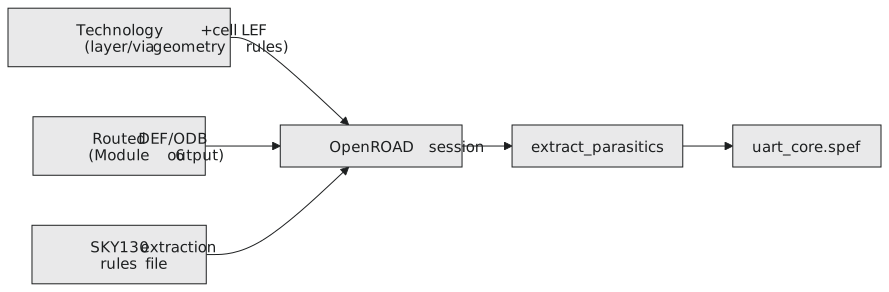
OpenRCX needs three things loaded first: the technology and cell LEF files (layer definitions and cell geometry), the routed DEF or ODB database with the actual wire geometry from Module 6, and the SKY130 extraction rules file you located two articles ago. Figure 1 shows how they come together.
Running the extraction
Start an interactive OpenROAD session, load the routed design and run extraction with the nominal rules:
openroad
% read_lef $PDK_ROOT/sky130A/libs.ref/sky130_fd_sc_hd/techlef/sky130_fd_sc_hd__nom.tlef
% read_lef $PDK_ROOT/sky130A/libs.ref/sky130_fd_sc_hd/lef/sky130_fd_sc_hd.lef
% read_def runs/uart_full/results/routing/uart_top.def

% define_process_corner -ext_model_index 0 X
% extract_parasitics -ext_model_file $PDK_ROOT/sky130A/libs.tech/openlane/rules.openrcx.sky130A.nom.calibre

% write_spef runs/uart_full/results/extraction/uart_top.nom.spef
define_process_corner names the extraction corner and picks which model inside the rules file to use. Each of the SKY130 rules files holds a single model, so the index is 0. extract_parasitics does the actual work, walking every routed net and computing R and C per segment as described two articles ago. write_spef writes the result to disk. The file names under $PDK_ROOT vary a little between PDK releases, so check them against what you found earlier.
The log is short. A clean run looks something like this:
[INFO RCX-0431] Defined process_corner X with ext_model_index 0
[INFO RCX-0029] Defined extraction corner X
[INFO RCX-0435] Reading extraction model file ...
[INFO RCX-0008] extracting parasitics of uart_top ...
[INFO RCX-0015] Finished extracting uart_top.
[INFO RCX-0016] Writing SPEF ...
[INFO RCX-0443] 1842 nets finished
A mistake to avoid is extracting before routing is complete and clean. The extractor cannot tell a net that was never finished from a net that is legitimately short. It will compute parasitics for whatever geometry exists, and a truncated route gives an optimistic, too-small load that looks fine right up until the chip comes back. Always check that detailed routing finished with zero unrouted nets and that the design is DRC clean before trusting a SPEF.
Pulling out the net we have been tracking
With the SPEF written, find parity_net. The file uses name-map indices, so first look up the index, then the *D_NET block:
SPEF=runs/uart_full/results/extraction/uart_top.nom.spef
grep -n "rx_ctrl/parity_net$" $SPEF          # gives the index, here *1
awk '/^\*D_NET \*1 /,/^\*END/' $SPEF
*D_NET *1 118.6
*CONN
*I *2:X O
*I *3:D I
*CAP
1 *2:X 9.4
2 *1:1 14.1
3 *1:2 11.8
4 *3:D 83.3
*RES
1 *2:X *1:1 6.2
2 *1:1 *1:2 18.9
3 *1:2 *3:D 41.7
*END
This is the entry we read by hand in the previous article: 118.6 fF in total, most of it at the far end, and a resistor chain that grows toward the load. On a real design the index will be a larger number, and a net with more bends and branches will have many more nodes, but the structure is the same.
In a normal OpenLane run this extraction happens automatically as part of the signoff STA step, and you rarely call extract_parasitics by hand. Knowing how to run it manually and where the output lands pays off the first time an automated run reports a suspicious timing number and you want to see whether the parasitics behind it look physically sensible.
Hands-on check
Confirm that the total on the *D_NET line equals the sum of the *CAP entries, the same check as in the previous article, now on real tool output:
$$9.4 + 14.1 + 11.8 + 83.3 = 118.6 \text{ fF}$$
For a single net read by hand, a mismatch usually means you missed some lines (coupling capacitances to other nets are listed in the same *CAP section, with two node names on the line). If you script the check across the whole file and the totals do not add up, that points at a problem in the extraction run itself, not a rounding quirk to ignore.
Practice Exercise
Suppose a routed net had a small gap somewhere along its length, a missing via for example, that detailed routing failed to report. What would the SPEF entry for that net describe, and why should routing completeness and DRC be confirmed before any SPEF is used for signoff?
Solution
The extractor would compute R and C for the geometry that exists. With a gap, part of the net’s metal is not electrically connected to the driver, so the RC network in the SPEF either stops short of some load pins or describes pieces that are not joined. Each number in the entry could look reasonable while the connectivity is simply wrong, and the timing computed from it would be meaningless for the loads beyond the gap, usually optimistic because less capacitance hangs on the driver. That is why routing completeness, DRC and connectivity checks (LVS in Module 8) are gating conditions: a SPEF can only be trusted if the geometry it describes is the geometry you intend to build.
With real parasitics for the whole design in hand, Section 7.3 runs OpenSTA against them, starting with a complete post-route timing report read from top to bottom.