Reading a Routing Violation Report
Section 6.5 is about the runs that do not cooperate. Up to now every routing report in this module ended the way you would hope: zero violations, clean. Real designs do not always do that on the first attempt, and when they do not, TritonRoute does not just say “failed”. It hands you a coordinate-indexed list of exactly what did not work and where. The list looks intimidating the first time, mostly because nobody has shown you its shape. This article fixes that, using a genuinely failing run, so the rest of the section has something concrete to diagnose and fix.
What a violation report contains
A TritonRoute violation report is a list of records, and every record answers the same questions: what kind of violation, which layer, exactly where in the design’s coordinates, and which nets. A realistic excerpt from a UART run that did not finish clean:
====== Detailed Routing Violation Report ======
Design: uart
Run: routing_run_02
Total violations: 14

[VIOLATION 1] Type: Short
  Layer: met2
  Location: ( 118400 176200 ) - ( 118900 176200 )
  Nets: tx_shift_reg[3], rx_shift_reg[1]

[VIOLATION 2] Type: MinSpacing
  Layer: met3
  Location: ( 140100 182000 )
  Nets: baud_gen_q[5]

[VIOLATION 3] Type: Unrouted
  Net: parity_check
  Pins: U412/A, U498/Y
  Reason: No legal path found within congestion bounds

...

[VIOLATION 14] Type: MinSpacing
  Layer: met2
  Location: ( 121800 179400 )
  Nets: tx_shift_reg[5]
The two families
Nearly every entry falls into one of two families, and they call for different next steps:
| Family | Example types | What it means | Typical next move |
|---|---|---|---|
| Geometric DRC violations | Short, MinSpacing, MinWidth, enclosure |
A wire or via was drawn, but it breaks a spacing, width or enclosure rule from Section 6.3 | Local fix: nudge geometry, change track or layer for that net, free up local space |
| Unrouted nets | Unrouted |
The router could not find any legal path for this net within its search bounds | Usually structural: congestion or a real blockage, not a geometric nudge |
Violation 1 is a Short between two nets on met2, a geometric violation with an exact location: two shapes ended up too close, or touching, where they should be separate. Violation 3 is categorically different. parity_check has no route at all, and the reason field says why: no legal path “within congestion bounds”, which is the report’s own way of pointing at the diagnosis the next article walks through.
Reading for clusters, not entries
Notice that violations 1, 2 and 14 all sit in a tight coordinate range, roughly x = 118000 to 142000 and y = 176000 to 182000. Clustering like that is rarely a coincidence.
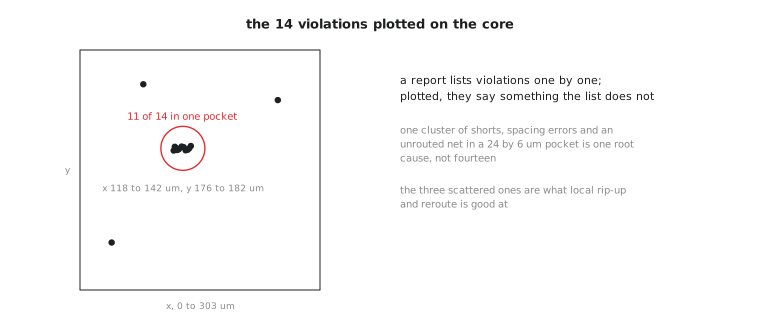
A cluster is usually the fingerprint of one bad local region, too much crammed into too little space, producing several different-looking violations rather than several unrelated problems. Fixing entries one at a time, top to bottom, without scanning for clusters first is the classic mistake. If three violations share a neighbourhood, fixing them independently, nudge this wire, adjust that via, often just moves the underlying shortage to a fourth spot nearby, producing a new violation next run somewhere that was clean before. Scan for clusters first. They usually share one root cause.
Parsing a record
Take violation 2. Layer: met3. Location: a single point, (140100, 182000) in database units, rather than a range like violation 1’s. A single point typically means the violation is centred on a specific feature, a via or a corner, rather than spanning a stretch of parallel wire the way the short does. MinSpacing belongs to the spacing family from Section 6.3: two shapes involving baud_gen_q[5] ended up closer than the applicable minimum allows.
Practice Exercise
A report shows this entry:
[VIOLATION 7] Type: Unrouted
  Net: reset_sync
  Pins: U88/Y, U201/D
  Reason: No legal path found within congestion bounds
Based only on the type and reason, is this more likely fixed by a small local nudge like violations 1 or 2, or does it call for the investigation the reason field hints at? Justify using the table.
Solution
The investigation. It is typed Unrouted, not a geometric type like Short or MinSpacing. Per the table, an unrouted net means the router found no legal path at all, not that it found one and drew it slightly wrong. The reason field says “within congestion bounds”, which is the report telling you directly that this is a structural space problem in that region, not an in-place geometry error. The next step is to look at what is causing the congestion near that net, most likely placement density, rather than coaxing into existence a path the router already searched for and could not find.
You now have the vocabulary to read a violation report. Next comes the actual judgement call: recognising when a failure like this one is not a routing problem at all, but placement or floorplan wearing a routing report as a disguise.