OpenLane as Orchestrator
The last two articles introduced five tools: Yosys, OpenROAD (itself an umbrella of six components), Magic, Netgen and KLayout. In principle you could run every one by hand: invoke Yosys, take its output, feed it into OpenROAD’s floorplan step, take that output, hand it to placement, and so on, managing a dozen intermediate files and making sure each tool gets exactly the format the previous one produced. Nobody wants to do that every time, and that is why OpenLane exists.
OpenLane does not do physical design; it runs the tools that do
This distinction matters more than it sounds. OpenLane itself does not synthesize, place, route or verify anything. It is a scripted orchestration layer, a flow controller, that knows the order to run Yosys, then OpenROAD’s stages, then Magic, Netgen and KLayout, and knows which output of each step becomes which input of the next. When you “run OpenLane”, what happens underneath is OpenLane calling each of those tools in sequence and passing files between them.
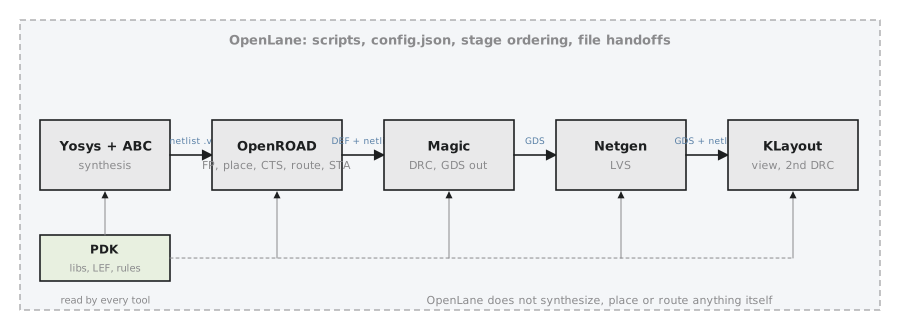
The value in one sentence: a designer runs one flow instead of gluing five tools together, and gets the right handoffs, the right stage order, and one configuration mechanism (config.json, Section 1.5) applied uniformly across all of them.
Same concepts, different paid names
If you ever touch a commercial flow, Synopsys Fusion Compiler or IC Compiler II, or Cadence Innovus with Genus for synthesis, you will recognise every stage in this course under another vendor’s name. The stages are the same industry-standard stages; only the branding, licensing and specific algorithms differ.
| Stage | OpenLane / open-source | Typical commercial equivalent |
|---|---|---|
| Synthesis | Yosys + ABC | Synopsys Design Compiler / Fusion Compiler, Cadence Genus |
| Floorplan / Placement / CTS / Routing | OpenROAD | Synopsys IC Compiler II / Fusion Compiler, Cadence Innovus |
| Static timing analysis | OpenSTA | Synopsys PrimeTime, Cadence Tempus |
| Physical verification (DRC/LVS) | Magic + Netgen + KLayout | Siemens Calibre, Synopsys IC Validator |
This matters for a career, not only for understanding. A physical designer who knows why floorplanning happens before placement and why timing signoff needs extracted parasitics can pick up a commercial tool’s syntax quickly. The concepts transfer; the button labels change.
The shape of an OpenLane run
Every run produces a directory tree with a predictable top-level shape, worth memorising now because every later module points back to it:
runs/<run-tag>/
├── synthesis/     # Module 2
├── floorplan/     # Module 3
├── placement/     # Module 4
├── cts/           # Module 5
├── routing/       # Module 6
├── signoff/       # Modules 7 to 9 (timing, DRC/LVS, GDSII)
└── reports/       # summary reports across every stage
Each folder corresponds to a module in this course. When Module 4 discusses placement, the artefacts it means are the files in runs/<run-tag>/placement/. When you run a full flow in Section 1.4, this is what you will look at afterwards. Note that automation here means consistent orchestration, not simplified physics: RePlAce, for instance, is a published, peer-reviewed global placement algorithm, the same category of algorithm a commercial flow runs.
Practice Exercise
You are told a run failed “during routing”. Without opening any logs, which folder in the run tree would you check first, and which second, to confirm the input routing received was reasonable?
Solution
Check runs/<run-tag>/routing/ first; that is where routing’s own logs, reports and any partial output land, and where the failure message is. But routing failures are very often caused upstream, for instance by a placement so dense or so unevenly distributed that the router cannot find room to complete every connection (congestion, covered in Module 6). So the second folder is runs/<run-tag>/placement/, specifically its congestion or density reports, to confirm the placement handed to routing was not already the source of the problem. This “check the failing stage, then the stage that fed it” habit recurs throughout the course.
In the next article, Section 1.3 turns to the other half of what the course targets, not the tools but the manufacturing process: the SkyWater SKY130 PDK, starting with what a PDK contains.